 |
IPSDK 4.2
IPSDK : Image Processing Software Development Kit
|
|
IPSDK 4.2
IPSDK : Image Processing Software Development Kit
|
| image = | enforceConvexity2dImg (inImg,halfKnlSize) |
| image = | enforceConvexity2dImg (inImg,halfKnlSize,nbAngles) |
Removes concavities in the object of the input image.
This algorithm modifies the objects in the images to make them convex. The parameter halfKnlSize is the size of the biggest concavity to fill.
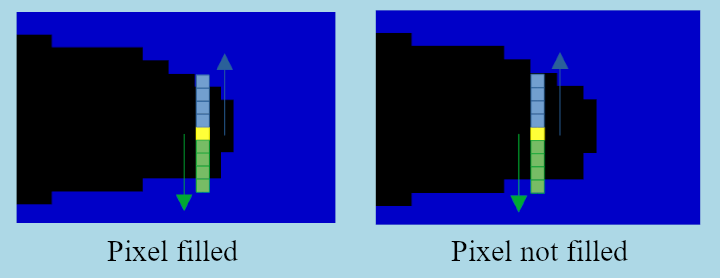
The algorithms relies on pair of oriented half linear structuring elements. For a given orientation, two opposite oriented half linear structuring elements are used to find neighbours with the same value. If such a neighbour is found, the same value is assigned to the current pixel.
The number of structuring element pairs is defined by the optional parameter nbAngles. This means that more the number of angles is high, more the result will be smooth but will require more calculations.
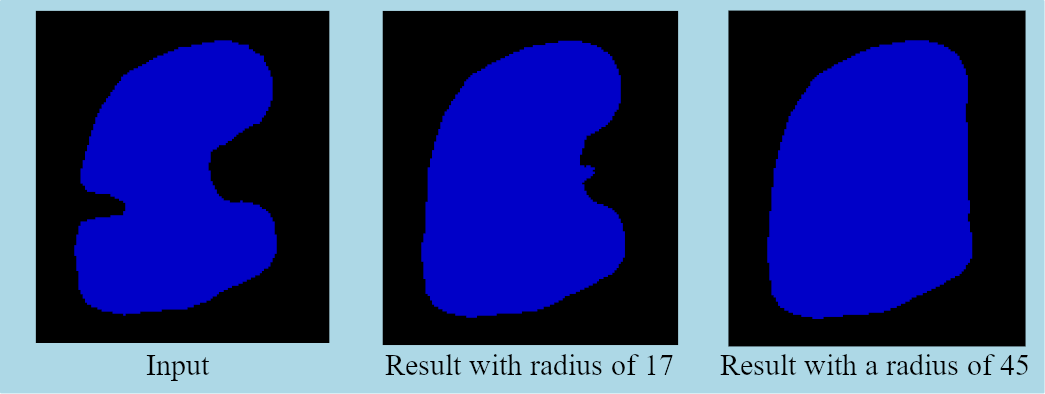
Here is an example of a result with a structuring element lenght of 17 and 45 :
Possible artifacts: if the structuring element size is not long enough, only some pixels of the concavity will be filled, leading to undesired partial growth. The figure below illustrates the cases where structuring elements are long enough to fill a pixel (left) and too short to fill another pixel (right):
 IPSDK by Reactiv'IP