 |
IPSDK 4.2
IPSDK : Image Processing Software Development Kit
|
|
IPSDK 4.2
IPSDK : Image Processing Software Development Kit
|
| image = | mergeRoiSeq2dImg (inSeqImg,outputSizeX,outputSizeY,roiOffset) |
Merge the input sequence of ROIs image into a single image.
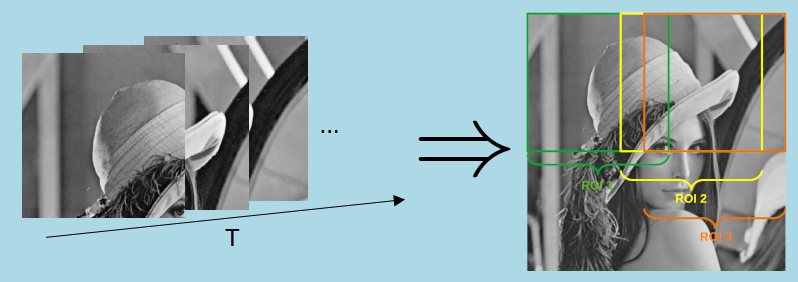
This algorithm merge the ROIs stored in the input sequence image.
The ROIs are described by their size. The offset parameter indicates the number of pixels separating two consecutive ROIs. If the offset is lower than the ROI size, the ROI overlap.
If the last ROI along a direction does not fit the image range, it is shifted so that each pixel in the ROI can be assigned to a value.
If the ROIs overlap, the values of each ROI associated to the same pixel are averaged.
Here is an example of merge with one row of ROIs for clarity:
 IPSDK by Reactiv'IP