
IPSDK 4.2
IPSDK : Image Processing Software Development Kit
Remove Holes 2d
imageremoveSmallHoles2dImg (inBinImg,minShapeSize)
imageremoveBigHoles2dImg (inBinImg,minShapeSize)

Detailed Description

Removes small or big holes in a binary 2d image.

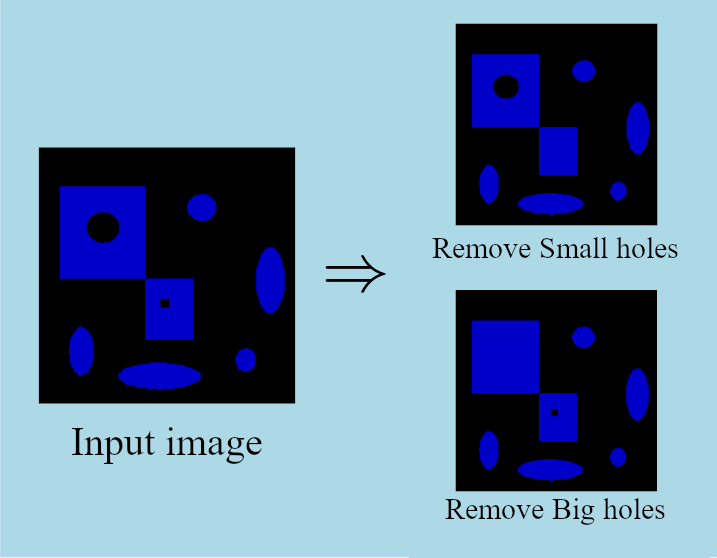
This algorithm allows to remove small or big holes in a 2D binary image.

removeSmallHoles2dImg removes small holes with a number of pixels lower than InMinShapeSize.

removeBigHoles2dImg removes small holes with a number of pixels higher than InMinShapeSize.

Here is an example of small and big holes removals:
removeHoles2dImg.png

Example of Python code :

Example imports

import PyIPSDK
import PyIPSDK.IPSDKIPLAdvancedMorphology as advmorpho

Code Example

# opening of input image
inBinImg = PyIPSDK.loadTiffImageFile(inputImgPath)
# Remove small holes
outImgSmall = advmorpho.removeSmallHoles2dImg(inBinImg, 120)
# Remove big holes
outImgBig = advmorpho.removeBigHoles2dImg(inBinImg, 120)

Example of C++ code :

Example informations

Header file

#include <IPSDKIPL/IPSDKIPLAdvancedMorphology/Processor/RemoveHoles2dImg/RemoveHoles2dImg.h>

Code Example

// opening input image
ImagePtr pInBinImg = loadTiffImageFile(inputImgPath);
// Remove small holes
ImagePtr pOutImgSmall = removeSmallHoles2dImg(pInBinImg, 120);
// Remove big holes
ImagePtr pOutImgBig = removeBigHoles2dImg(pInBinImg, 120);